




technologies
How to Implement Claude in Your Company: Connectors, Skills, Security and Training
Cristian CabreraOctober 21, 2026 | 9 min
Implementing Claude in a company is not about buying licenses and sending out a link. It means setting up Claude Team or Claude Enterprise with SSO access, connecting it to the systems you already use (Google Workspace, CRM, ERP) through MCP connectors, loading Skills with each department's processes and training the team on those real use cases. In this guide we show you how we do it at We make it Lab, step by step.
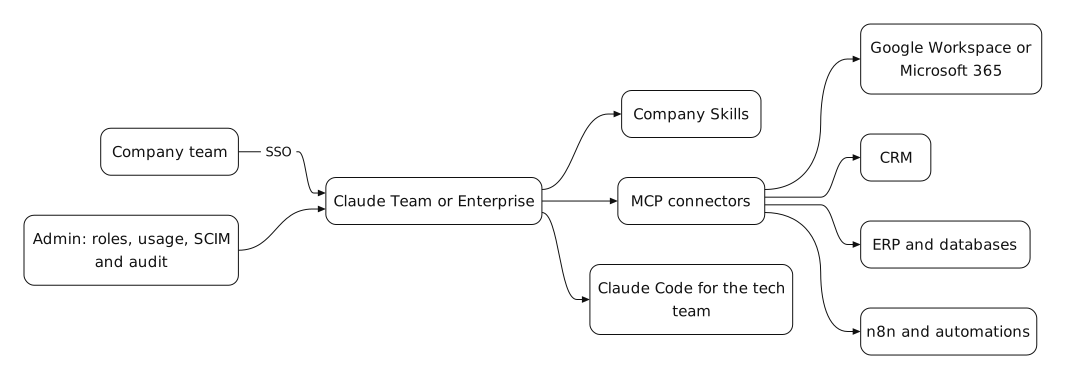
What gets configured in a Claude implementation
A complete implementation covers six pieces. If any of them is missing, the team ends up copying and pasting data into the chat, which is exactly what we want to avoid.
- Plan and seats. Claude Team is built for teams of 2 to 150 people and offers Standard or Premium seats (Premium gives you 5 times more usage). Claude Enterprise starts at 20 seats and usage is billed separately at API rates. We compare both plans in detail on our Claude training and setup page. Check current pricing at claude.com/pricing.
- SSO access and user management. Both plans include single sign-on (SSO) with Google Workspace or Microsoft. Enterprise adds SCIM: user provisioning and deprovisioning sync automatically from the company directory. On Team, removing an employee is done manually.
- MCP connectors. MCP (Model Context Protocol) is the open standard Claude uses to connect with other tools. With connectors, Claude can read a Drive document, look up a customer in the CRM or query a database without anyone copying anything. For in-house systems (an on-premise ERP, an internal database) a custom MCP server is developed. The administrator decides which connectors are enabled.
- Company Skills. A Skill is a package of instructions and files that Claude uses when the task calls for it: the sales proposal template, the weekly report format or a client onboarding checklist. They are published for the whole organization and each department uses its own without rewriting the prompt.
- Cowork and Claude Code. Cowork lets Claude carry out multi-step tasks with files and applications, designed for non-technical teams. Claude Code is the tool for development and IT. Both are included in Team and Enterprise.
- Usage policy and tracking. Which data can go into Claude and which cannot, who approves a new connector and how adoption is measured by department. Without this, the implementation depends on each person's goodwill.
Step by step: how we implement Claude in 6 phases
This is the order we follow. The key is not to open Claude to the whole company on day one: first a pilot department with measurable use cases, then everyone else.
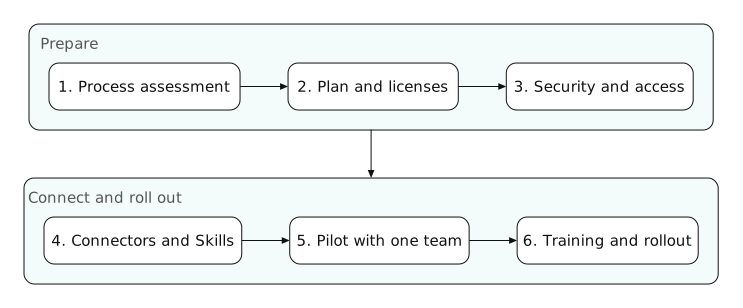
- 1. Process assessment. We map which tasks each department repeats, which systems hold the data and where time is being lost. The result is a prioritized list of use cases, not a list of features.
- 2. Plan and licenses. With the use cases defined, we estimate usage and choose Team or Enterprise, and how many Standard and Premium seats. Licenses are paid directly to Anthropic.
- 3. Security and access. We configure SSO, roles, the data policy and, on Enterprise, SCIM, retention and audit logs. All before the first user signs in.
- 4. Connectors and Skills. We enable the connectors each use case needs (Google Workspace, Slack, CRM) and build custom MCP servers when required. We write the first Skills using the company's real material. If you already work with automations, Claude integrates with your n8n automations.
- 5. Pilot with one department. One department uses Claude on its use cases for a few weeks. We measure time saved and errors, and adjust Skills and permissions based on what comes up in real use.
- 6. Training and rollout. Once the pilot is validated, we train the remaining departments on what is already set up and open access by groups.
Security checklist before opening Claude to the whole company
The question we hear most from leadership is whether Claude trains on company data. On Team and Enterprise, Anthropic does not use your content to train models by default. Even so, the following needs to be sorted out:
- Mandatory SSO. Nobody signs in with personal accounts or standalone passwords.
- Data matrix. Which information can go into Claude (internal documents, customer data) and which cannot (card data, health information if the corresponding agreement does not apply).
- Least-privilege connectors. Start with read access and add write access only where the use case justifies it.
- Roles by department. On Enterprise, each group sees only the connectors, models and features it needs.
- User offboarding. With SCIM it is automatic. Without SCIM, add it to the HR offboarding process.
- Audit and retention. If your compliance requires it (financial services, healthcare, government), you need Enterprise: audit logs, Compliance API and configurable data retention.
You may also like
Training: the team learns on what is already set up
A general talk about artificial intelligence is motivating, but it does not change how a department works. That is why we train at the end of the implementation, with each team's Skills and connectors already working: leadership covers governance and costs, departments work on their own use cases and IT learns Claude Code and how to maintain the MCP servers.
Frequently asked questions about implementing Claude
- Does Claude train on my company's data? No. On the Team and Enterprise plans, Anthropic does not use your content to train models by default.
- Should I choose Claude Team or Claude Enterprise? Team is enough for most companies with up to 150 people. Enterprise is justified when you need SCIM, audit logs, configurable data retention or spend control by department.
- Can Claude connect to my CRM or ERP? Yes. Many tools already have an MCP connector. For in-house or on-premise systems, a custom MCP server is developed that exposes only the data you want to share.
- What is a Claude Skill? A package of instructions and files that Claude uses automatically when the task requires it, for example the proposal template or a report format. They are published for the whole organization.
- Do you need to know how to code to use Claude in a company? Not to use it. You do to build custom connectors or use Claude Code, which is the part we handle in the implementation.
- Are the licenses purchased through you? No. Licenses are purchased directly from Anthropic. We handle the technical implementation and the training.

Cristian Cabrera
If you already have Claude licenses and your team uses it as just another chat, the next step is to connect it to your systems. At We make it Lab we handle the assessment, the technical setup and the training on your real use cases.

Branding✱
Web Development✱
SEO & Blogging✱
Social Media✱
Paid Media✱
Email Marketing✱
Automation✱
AI Agents✱
Branding✱
Web Development✱
SEO & Blogging✱
Social Media✱
Paid Media✱
Email Marketing✱
Automation✱
AI Agents✱
Branding✱
Web Development✱
SEO & Blogging✱
Social Media✱
Paid Media✱
Email Marketing✱
Automation✱
AI Agents
Related Blogs
Latest related blogs

Qualified leads in the industrial B2B sector: how to generate them with a proven system
Discover how to generate qualified leads in the industrial B2B sector: proven system to sell more.

The Best Programming Languages in 2026: A Guide to Staying Up-to-Date with the Latest Trends
Discover the most popular and relevant programming languages for web development in 2026.

Google Ads Display: Strategies and Best Practices for Digital Growth
Discover the best practices to optimize your Google Ads Display campaign and increase your conversions.
Branding✱
Web Development✱
SEO & Blogging✱
Social Media✱
Paid Media✱
Email Marketing✱
Automation✱
AI Agents✱
Branding✱
Web Development✱
SEO & Blogging✱
Social Media✱
Paid Media✱
Email Marketing✱
Automation✱
AI Agents✱
Branding✱
Web Development✱
SEO & Blogging✱
Social Media✱
Paid Media✱
Email Marketing✱
Automation✱
AI Agents