



technologies
Claude Cowork: What It Is and How to Use It in Your Company
Cristian CabreraOctober 21, 2026 | 7 min
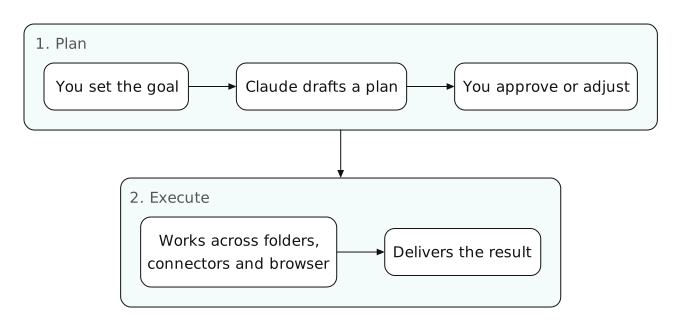
Claude Cowork is how you give Claude multi-step work: you set a goal and Claude builds a plan, works with the folders, connectors and tools you have enabled for it and delivers the result. It is like Claude Code, but for office tasks instead of programming. It is included in Pro, Max, Team and Enterprise.
Anthropic announced that Claude Cowork is now just Claude: Cowork is being integrated into the Claude app, starting with Pro and Max and then the rest of the plans. When you read Cowork, think of the Claude mode that carries out tasks, not a separate product. More details on the official page.
What Claude Cowork can do
According to Anthropic's documentation, these are the main capabilities:
- Work with folders. In the desktop app you give it access to a folder and Claude reads, organizes and creates files there, without you having to paste content into the chat.
- Use connectors and plugins. It can query Google Drive, Microsoft 365 or the CRM through MCP connectors, and use Skills with the company's processes.
- Scheduled tasks. A recurring task (the Monday report, the Friday invoice check) can run on its own, even if you close your computer.
- Its own browser. In the desktop app it has a browser separate from yours, without your sessions or tabs.
- Parallel work. It splits a large project into parts that move forward at the same time, and you can follow along from your phone.
Use case examples by department
What we see working best are repetitive tasks with a clear output format:
- Administration and finance: build the monthly expense spreadsheet from PDF receipts or screenshots, and flag the ones that do not match the bank statement.
- Marketing: prepare the weekly report by pulling data from several spreadsheets and write the client summary using the reporting Skill.
- Sales: with the CRM connected, prepare the sales proposal for an opportunity using the template and the current price list.
- Operations: a scheduled task that checks a shared folder every day and alerts you if a document is missing.
Security and controls for companies
Since Claude can act on files and tools, permissions need to be configured properly. This is what Cowork offers:
- Access only to what you choose. Claude works within the folders and tools you enable.
- Approval before important actions. With permissions turned on, it shows the plan and waits for your OK. Deleting any file always requires approval.
- Admin controls on Team and Enterprise. Access by team, spend limits, tool permissions by department and the option to turn off Cowork for the whole organization.
- Traceability. Activity can be sent to the company's SIEM via OpenTelemetry. Enterprise adds usage analytics.
Cowork delivers when it is connected to your systems
Without connectors or Skills, Cowork is an assistant that organizes files. With the company's CRM, ERP and templates connected, it does the whole job. That is what we set up in a Claude implementation.
Frequently asked questions about Claude Cowork
- What is Claude Cowork? The Claude mode that carries out multi-step tasks on your files, connectors and tools, with a plan you can approve or adjust.
- Does Cowork cost extra? No. It is included in Pro, Max, Team and Enterprise, although it uses up the usage limit faster than chat.
- Does Cowork work on Windows? Anthropic offers the desktop app for macOS, and Cowork also works on the web and on mobile. Check current availability on the official page.
- Can Cowork delete files? Only with your explicit approval. Even so, it is best to give it access to working folders and not the entire drive.
- Can Cowork be turned off in the company? Yes. On Team and Enterprise the administrator can turn it off for the whole organization or limit it by team.

Cristian Cabrera
If you want Cowork to handle your team's real tasks, it first needs to be connected and have permissions defined. At We make it Lab we configure it around your processes and train each department.

Branding✱
Web Development✱
SEO & Blogging✱
Social Media✱
Paid Media✱
Email Marketing✱
Automation✱
AI Agents✱
Branding✱
Web Development✱
SEO & Blogging✱
Social Media✱
Paid Media✱
Email Marketing✱
Automation✱
AI Agents✱
Branding✱
Web Development✱
SEO & Blogging✱
Social Media✱
Paid Media✱
Email Marketing✱
Automation✱
AI Agents
Related Blogs
Latest related blogs
Claude Skills: What They Are and How to Create Skills for Your Company
What Claude Skills are, how they work, how to create one (with a SKILL.md example) and how to publish them for the whole organization on Team and Enterprise.
Claude vs ChatGPT for Business: Plans, Security and Integrations Compared
Comparison of Claude Team and Enterprise against ChatGPT Business and Enterprise: pricing, minimum users, data privacy, connectors and when each one makes sense.

Cold Email with Instantly: Step-by-Step Guide to B2B Prospecting
The complete process to set up your B2B cold email operation with Instantly and Apollo. From signing up for the tools to sending your first campaign with A/B testing.
Branding✱
Web Development✱
SEO & Blogging✱
Social Media✱
Paid Media✱
Email Marketing✱
Automation✱
AI Agents✱
Branding✱
Web Development✱
SEO & Blogging✱
Social Media✱
Paid Media✱
Email Marketing✱
Automation✱
AI Agents✱
Branding✱
Web Development✱
SEO & Blogging✱
Social Media✱
Paid Media✱
Email Marketing✱
Automation✱
AI Agents