



technologies
How to Connect Claude to Your CRM or ERP with MCP
Cristian CabreraOctober 21, 2026 | 8 min
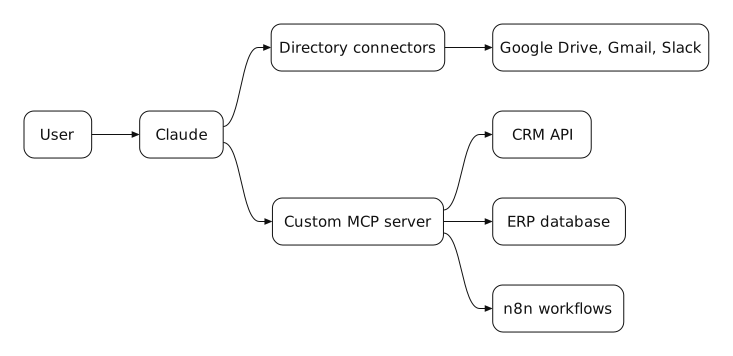
For Claude to query your CRM or ERP you use MCP (Model Context Protocol), the open standard Claude uses to connect to other tools. If your system already has a connector in the Claude directory, it can be enabled in minutes. If it is an in-house or on-premise system, a custom MCP server is developed that exposes only the data and actions you want to share.
This is what sets Claude apart from a chat: instead of copying and pasting data, Claude looks up the customer, reads the invoice or builds the report directly from the system, with the permissions you defined.
Directory connector or your own MCP server
The first decision is whether your system already has a connector:
- Directory connectors. Anthropic maintains a directory of verified connectors for common tools (Google Drive, Gmail, Slack and many more). They are enabled from settings and each user signs in with their own account.
- Custom connectors. Any remote MCP server can be added with its URL. Anthropic warns that these connectors are not verified, so you need to carefully review which service is being connected and what Claude can do there.
- Your own MCP server. For an on-premise ERP, an internal database or a CRM without a connector, a server is developed that exposes specific tools, for example find customer, check balance or list pending orders.
How we connect a CRM or ERP step by step
This is the order we follow in an implementation:
- 1. Define the use cases. Which questions Claude needs to be able to answer and which actions it can take. That defines the server's tools, not the other way around.
- 2. Start read-only. For the first few weeks Claude only queries. Write access (creating a contact, updating an order) is added later and with approval.
- 3. Build and publish the server. Remote connectors connect from Anthropic's infrastructure, so the server must be reachable from the internet or allow the IP ranges Anthropic publishes. Authentication is done with OAuth.
- 4. Enable it in the organization. On Team and Enterprise, the owner adds the connector and each user activates it with their own account.
- 5. Add Skills. A Skill tells Claude how to use that data: the report format or the business rules.
Shortcut: use n8n as an MCP server
If the company already has automations in n8n, a workflow can be exposed as an MCP tool. That way Claude triggers processes that already exist (checking stock, generating an invoice, adding a lead) without building a server from scratch. We use it in projects with n8n automations and with CRMs like GoHighLevel.
Security when connecting Claude to your systems
- Least privilege. The server exposes only the tools needed, not the entire database.
- Users with their own permissions. Each person authenticates with their own account, so Claude sees the same things that person can see.
- Approval to write. Actions that modify data require confirmation.
- Logs. The server records what Claude queried or modified and on whose behalf.
You may also like
Connecting Claude is technical work: we do it for you
Building an MCP server, publishing it with OAuth and defining permissions is not something you solve in a single talk. It is the core of our Claude implementation.
Frequently asked questions about MCP and connectors
- What is MCP? Model Context Protocol, the open standard that lets Claude connect to external tools and data.
- Can Claude connect to my CRM? Yes. If your CRM has a connector in the directory it is enabled directly; if not, an MCP server that uses its API is developed.
- What about an on-premise ERP? Yes, with your own MCP server. Since Claude connects from Anthropic's cloud, the server must be published securely or allow its IP ranges.
- Can Claude modify data in my systems? Only if the server exposes those actions. We recommend starting read-only and adding write access with approval.
- Which Claude plan do I need to use connectors? Connectors are available on paid plans. On Team and Enterprise the administrator controls which ones can be used.

Cristian Cabrera
If you want Claude to work with your CRM or ERP data, at We make it Lab we build the MCP server, publish it securely and leave it up and running for your team.

Branding✱
Web Development✱
SEO & Blogging✱
Social Media✱
Paid Media✱
Email Marketing✱
Automation✱
AI Agents✱
Branding✱
Web Development✱
SEO & Blogging✱
Social Media✱
Paid Media✱
Email Marketing✱
Automation✱
AI Agents✱
Branding✱
Web Development✱
SEO & Blogging✱
Social Media✱
Paid Media✱
Email Marketing✱
Automation✱
AI Agents
Related Blogs
Latest related blogs

Dominating Keywords: A Guide for SEM and SEO
Have you ever wondered why some websites always appear in the top search results?

Where to buy a domain: Guide to choose the best domain for your business
Do you want to create a website for your business? Don't miss this guide to choose the best domain!

User Experience as a Key Factor
Discover the latest social media trends and how they will impact digital marketing in 2026.
Branding✱
Web Development✱
SEO & Blogging✱
Social Media✱
Paid Media✱
Email Marketing✱
Automation✱
AI Agents✱
Branding✱
Web Development✱
SEO & Blogging✱
Social Media✱
Paid Media✱
Email Marketing✱
Automation✱
AI Agents✱
Branding✱
Web Development✱
SEO & Blogging✱
Social Media✱
Paid Media✱
Email Marketing✱
Automation✱
AI Agents